SCSessionCommand

For Mac · works with Claude Code

SessionCommand

A kanban board over your Claude Code sessions.

Every session in flight on one board. Open any card into a live terminal or a clean read-only mirror. See where the hours went.

Signed with an Apple Developer ID and notarized by Apple. Apple silicon. Install steps are in the README.

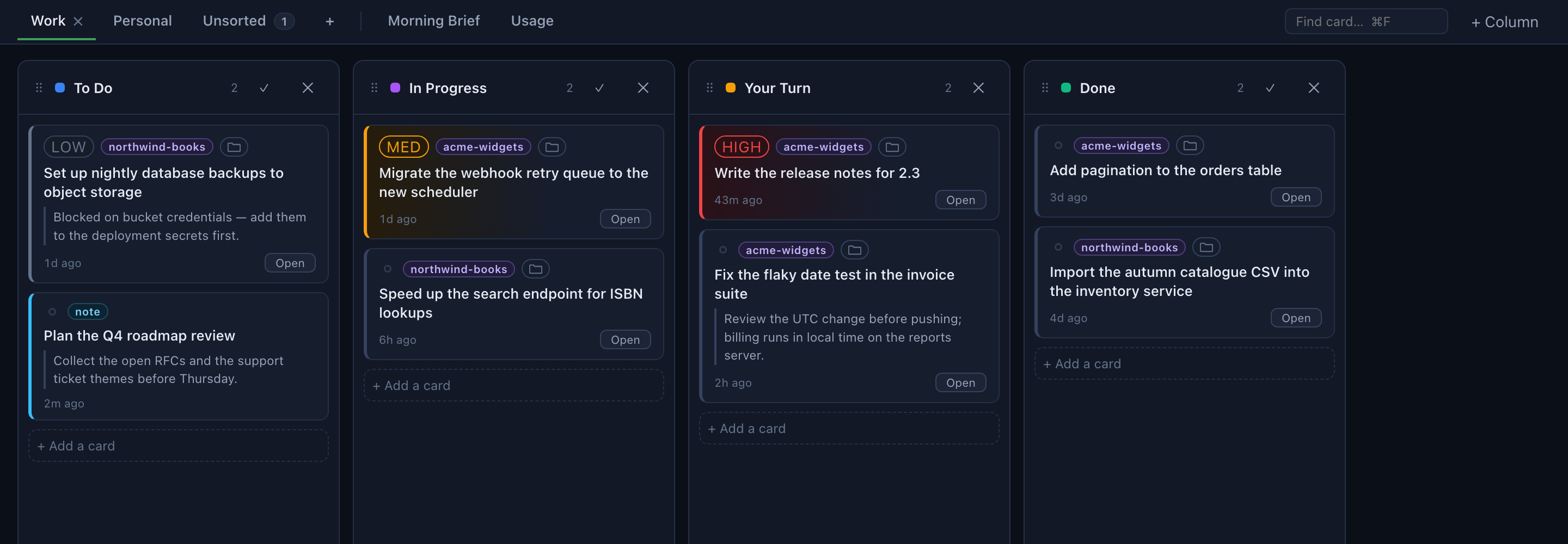
The board: four columns — To Do, In Progress, Your Turn, Done — each holding session cards with a label, a priority chip and a note.

The idea

Top-down, not bottom-up

A Claude session is bottom-up: you are inside one conversation, and it is the only vantage point on its own work. This is top-down — the board is the vantage point, every session in flight is visible at once, and you direct work into sessions rather than discovering it inside them.

— David J.S. Madgett

That is the right shape for one piece of work and the wrong shape for several. Two sessions are a pair of windows; six are a memory test, because nothing above them knows they exist. SessionCommand puts something above them.

Inside a sessionAbove the board
The unit of attention is the conversation you are inThe unit is the portfolio of work in flight
Context is re-established inside every sessionContext is attached above and handed down
"Is it finished?" means going to lookFinished work moves itself into review
More parallelism means more windows to hold in your headMore parallelism means more rows to scan

The board

Nothing to import

Sessions are discovered from ~/.claude/projects/ on their own. Your existing sessions are on the board the first time it opens.

  • Every card carries a label — a client, a case, a project — a stage, deadlines and a note.
  • Drag cards between columns. Boards are tabs; each has its own columns, and columns are yours to rename, recolor, reorder, add and delete.
  • Your Turn is the inbox: when a session finishes, or stops to ask you something, its card moves there by itself.
  • A priority chip — High, Medium, Low — colours the card's edge; High goes to the top of its column.

Nothing on the board ever modifies or deletes a Claude Code transcript. Archiving and renaming touch only the board's own database.

The board view with four columns of session cards.

The card

Live terminal, or a clean mirror

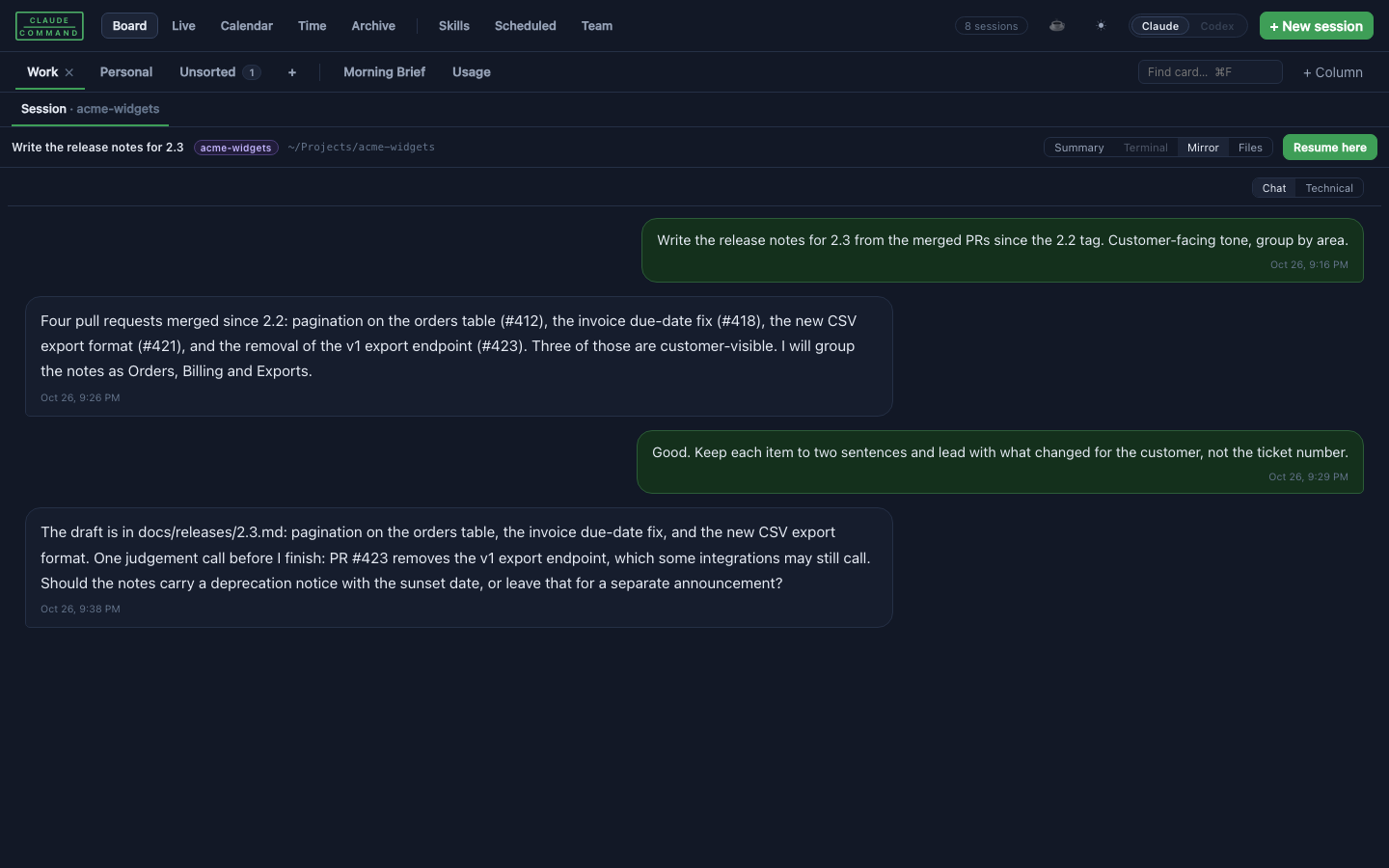
Open a card and work in the session as a real terminal, or read it as a mirror: a clean, read-only rendering of the conversation.

  • Summary opens on what the session did — files it edited, commands it ran — before any transcript.
  • Mirror · Chat shows what you typed and the answer you got, with the tool traffic filtered out. Technical puts every call, input and output back, unchanged.
  • Files lists what the session produced: what it wrote, and what else changed in its folder while it ran.
  • Resume here picks the transcript back up in a live terminal.
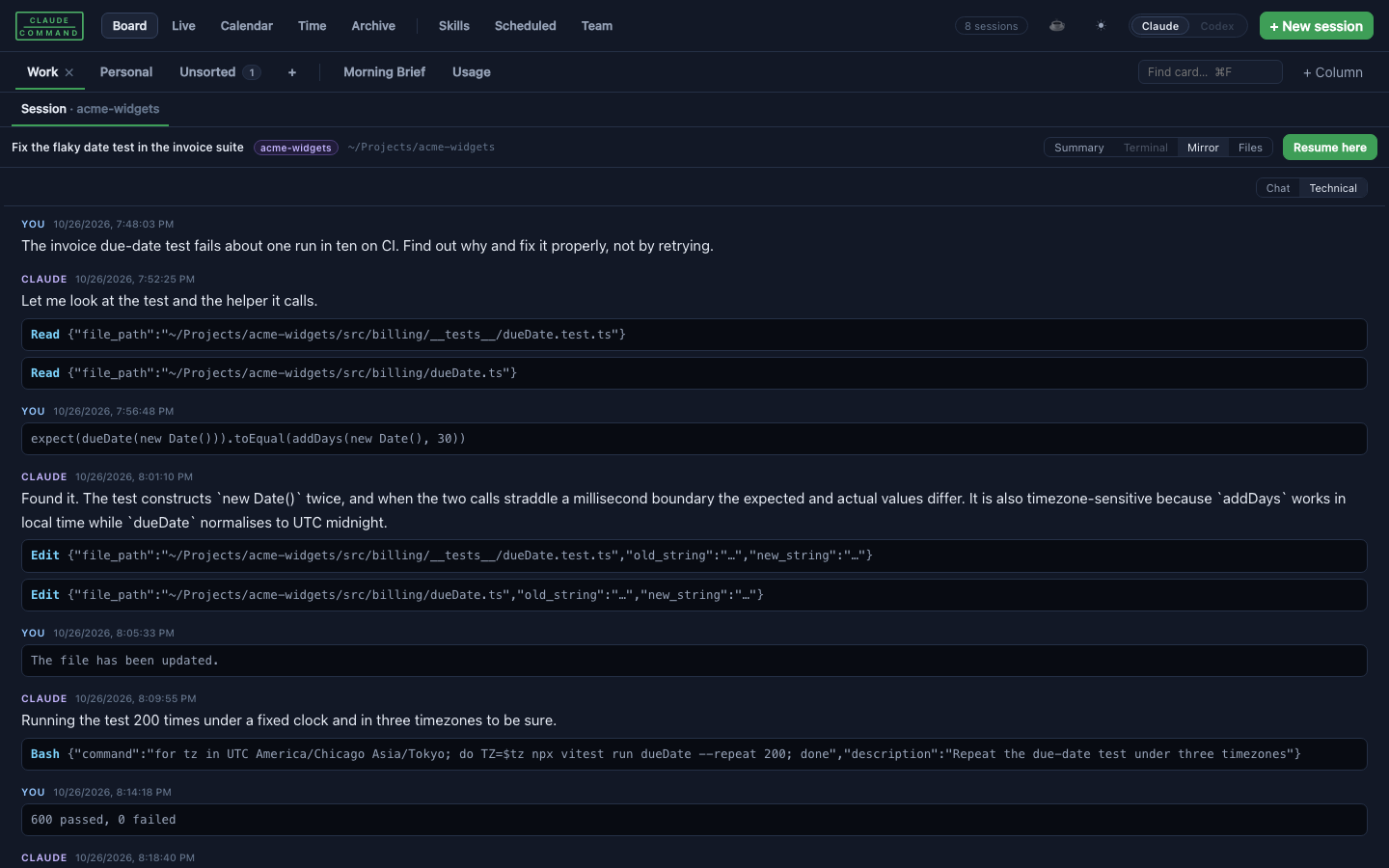
A card opened in Mirror view: the conversation shown as chat bubbles, with Summary, Terminal, Mirror and Files tabs above.
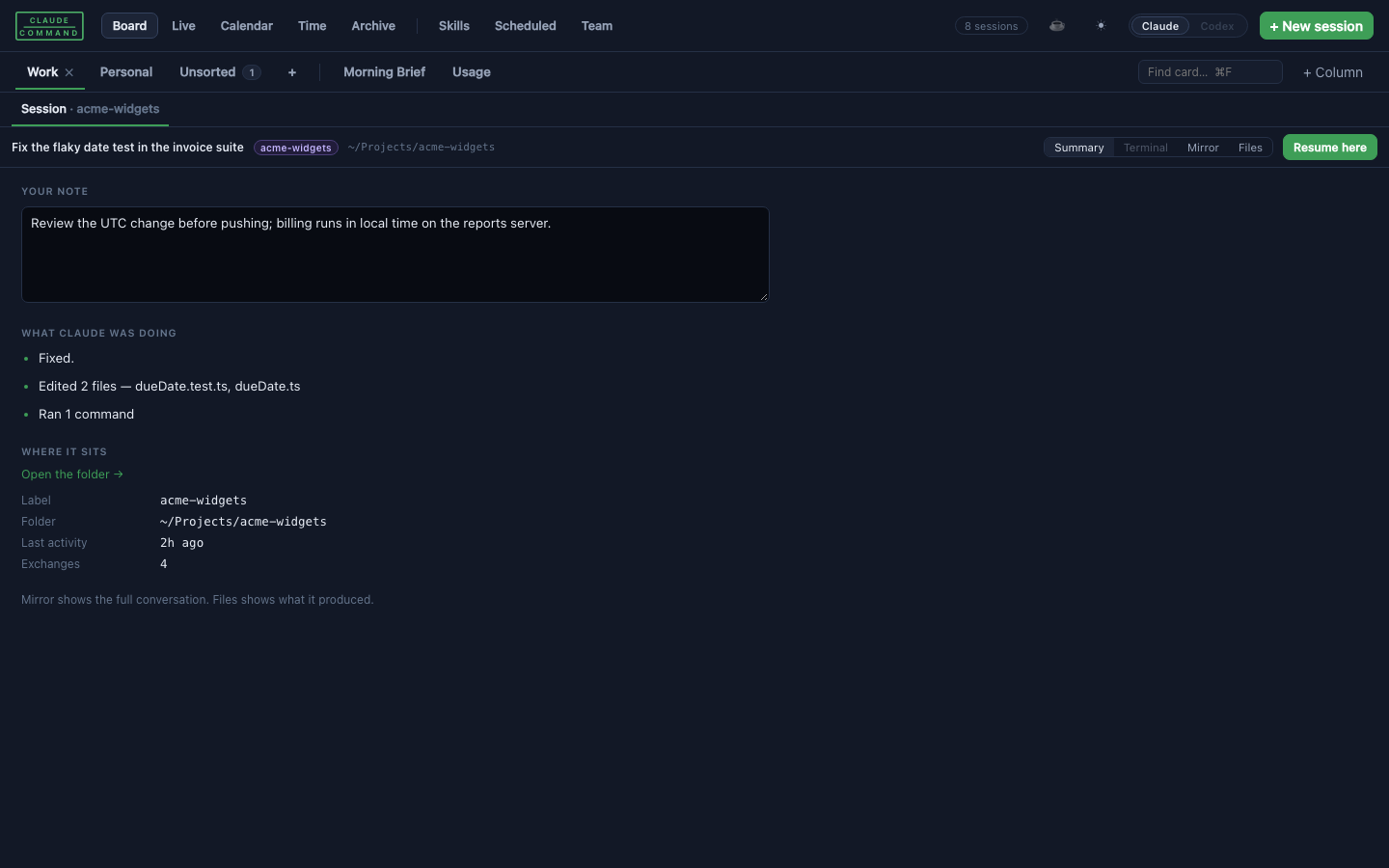
The Summary tab: your note, what Claude was doing, and where the session sits.
Summary: your note, what the session did, where it sits.
The Technical view of a mirror, with every tool call shown inline.
Technical: every tool call, input and output, unchanged.

Time and calendar

Where the hours went

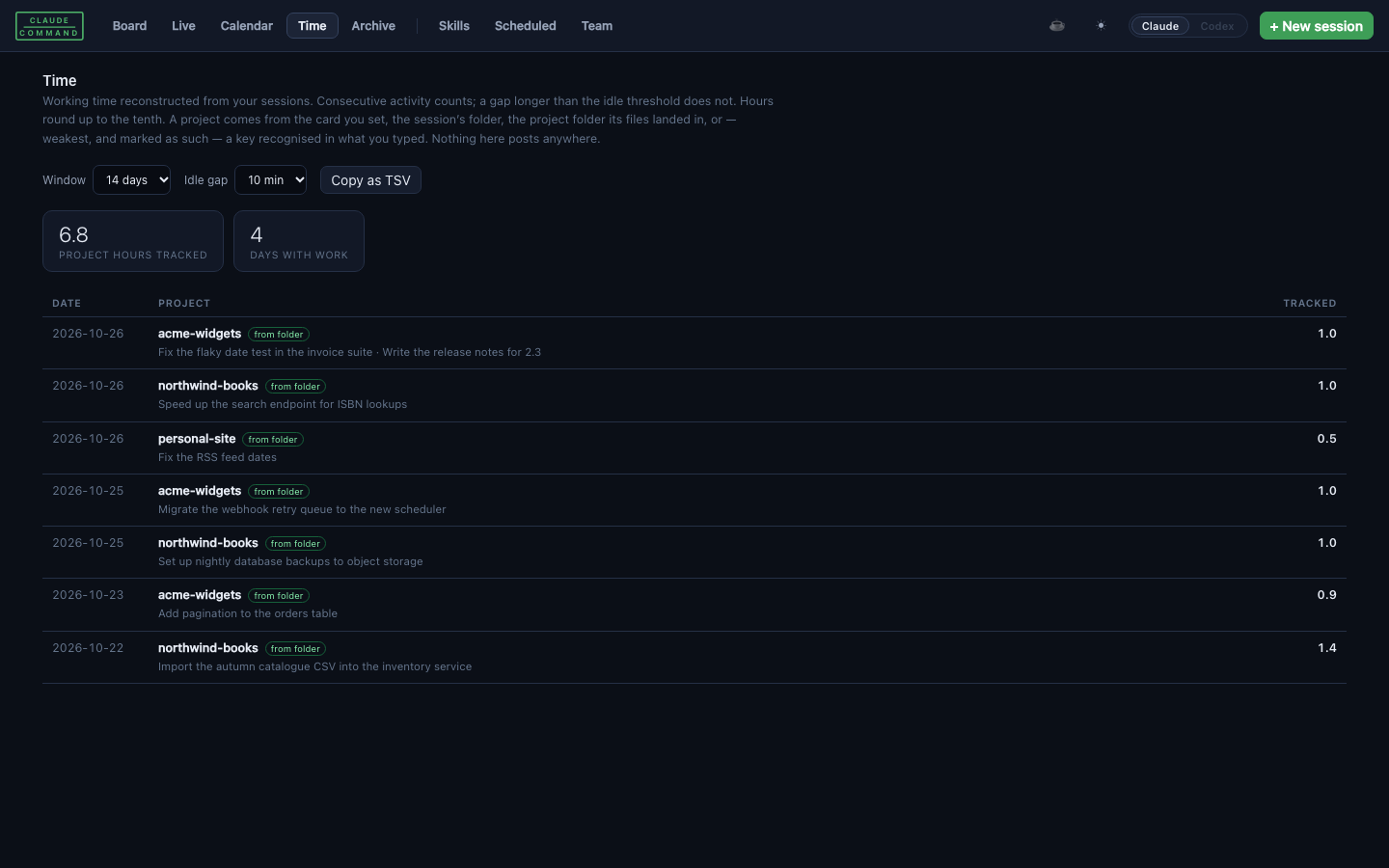
The Time view reconstructs working hours from the sessions themselves and groups them by label. Consecutive activity counts; a gap longer than the idle threshold does not. Hours round up to the tenth, the way billing systems do.

  • Every row says which rule attributed it — the label you set, the session's folder, the folder it wrote into, or a key recognised in what you typed. Sessions no rule can place stay unattributed rather than guessed.
  • Point it at a program that reports hours already recorded elsewhere and the view subtracts them, leaving only work not yet written down.
  • Copy as TSV gives you rows to work from. Nothing here posts anywhere.
  • The Calendar view matches your events against labels; a session started from an event opens in that label's folder with the deadline already on its card.
The Time view: a table of dates, projects and tracked hours, each row marked with the rule that attributed it.

Labels

Labels from wherever your work already lives

A label is the answer to which piece of work is this session about — a client, a case, an account, a product line. Labels are off until you switch them on, and the board works without them.

Folders on disk

Every subfolder of a root you name becomes a label, and a session started in one is labelled by it. No account, no key, no network.

Any program that prints JSON

Run a command of your own that prints the list. Your program already knows how to sign in to your practice-management or project system; the board only needs its answer. That is how a firm points it at its case list.

Or none

Switch labels off entirely. Cards, columns, mirrors and the time log all still work; the time log then shows hours per folder.

Turning labels on is one line of configuration:

{ "labels": { "root": "~/Projects", "noun": "project" } }

A card started in a label folder is labelled from the folder. Otherwise the board reads what you typed: a key that matches a real label is applied; a name that merely resembles one is offered as a chip with a ✓ and a ✕, never applied. A label you set by hand outranks every inference.

Privacy

What leaves your Mac

The server binds to 127.0.0.1 only; nothing else on your network can reach the board. The app's code names two outside hosts, and this is all of it:

  • A release check. The Mac app asks GitHub's releases API for the newest release, on by default, roughly hourly. A new version is downloaded from GitHub and installed only if it carries a valid signature from the same Apple Team ID and bundle identifier as the copy already running. It can be turned off in config.json.
  • An optional usage panel. The Usage tab can show the plan meter that Claude Code itself shows; to do so it calls an Anthropic endpoint. It is optional and can be turned off.

Labels fetched by a command of yours go wherever your program goes; the board reads only the JSON it prints. Nothing is written to any external system, and no transcript is ever altered. Details are on the privacy page.

Origin

Built by a lawyer

SessionCommand was written by David J.S. Madgett — lawyer and software developer, founder of Madgett Law, LLC in Minneapolis, and a former Air Force JAG — to run his own practice, then generalised. That history shows in the examples: labels look like matter numbers because that is what they started as. Read them as "whatever your work is filed under".

More of the firm's software and the thinking behind it: Practice Lab · madgettlaw.com/software.

Using the software creates no attorney-client relationship with Madgett Law, LLC.

License

Free

SessionCommand is released under the PolyForm Shield License 1.0.0.

Free for anyone, businesses included. You can read, run, modify and share it for any purpose, with one reservation: you may not use it to provide a product that competes with SessionCommand. The license defines competition broadly — goods and services compete even when they are provided free of charge, through a different kind of interface, or for a different platform.

Questions about what counts as competing go to GitHub Issues.

This is a summary. The license text is the agreement.

Download

SessionCommand 1.0.1

Released 2026-10-23. For Apple silicon Macs. Signed with an Apple Developer ID and notarized by Apple (Team ID 37LD23JKD7). Install steps are in the README.

Download the latest release

Verify the signature

After installing, ask macOS to assess the app. Use the app's name as it appears in Applications:

spctl -a -vv "/Applications/SessionCommand.app"

A good copy answers accepted, source=Notarized Developer ID and an origin line ending in (37LD23JKD7).

Support

Bugs and questions go to GitHub Issues. There are no support contracts.